You spent time building a LinkedIn profile that tells your full professional story. Your resume, by necessity, is a condensed version of that story. But here is the problem many Nigerian job seekers face: they have a decent LinkedIn profile sitting unused while their resume goes out without a link to it, and hiring managers who want to learn more about them have no easy way to do so. This guide will show you the step-by-step guide on how to put your linkedin on your resume.
The solution is simpler than most people think. Adding your LinkedIn on your resume takes less than five minutes if you know exactly where to place it, how to format it, and what to do before you add it to make sure the link actually helps rather than hurts your application. This post walks you through every step with clear examples so you can do it correctly today.
Should You Put LinkedIn on Your Resume?
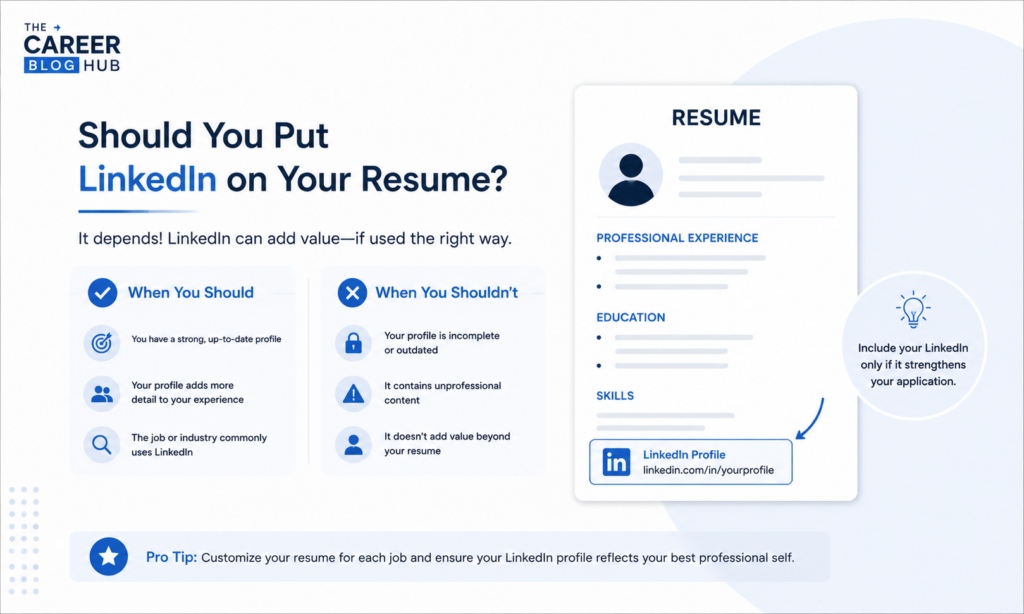
This is the first question many job seekers ask, and the answer is almost always yes. According to LinkedIn’s own research, recruiters view LinkedIn profiles as an essential part of the candidate evaluation process. Including your LinkedIn profile on your resume gives hiring managers a direct path to your full work history, recommendations, skills endorsements, and professional content that a one or two-page resume simply cannot contain.
The only exception is when your LinkedIn profile is outdated, incomplete, or has information that contradicts your resume. In that case, fix the profile first before adding the link. A LinkedIn profile that makes you look less impressive than your resume is worse than no link at all.
For Nigerian professionals competing in a job market where thousands of applications land in recruiter inboxes every week, a complete and well-linked LinkedIn profile signals professionalism and attention to detail that many other applicants overlook. It is a small addition with a potentially significant impact on how seriously your application is taken.
Make Your CV Stand Out
If your CV isn’t clearly showcasing your technical projects, academic achievements, SIWES readiness, leadership experience, and engineering or technology skills, you may be missing opportunities. A professionally structured CV can help present your value more effectively. Need yours refined? Contact us via WhatsApp: +2348145289661.
Step One: Create a Custom LinkedIn URL
Before you add your LinkedIn URL on your resume, the first thing you need to do is customize it. When you first create a LinkedIn account, your profile URL looks something like this: linkedin.com/in/firstname-lastname-a7b3c2d. That string of random characters at the end looks unprofessional and wastes valuable space on your resume.
Customizing your LinkedIn URL takes less than two minutes. Here is how to do it:
- Log into your LinkedIn account and navigate to your profile page
- Click the pencil edit icon in the top right section of your profile
- Select “Edit public profile and URL” from the options that appear
- Click the pencil icon next to your current URL on the right side of the page
- Type your preferred custom URL, ideally your full name with no spaces such as linkedin.com/in/johnadekunle
- Click Save
Your ideal custom URL is simply your name as it appears professionally. If your exact name is already taken, try adding your middle name initial, your professional title, or your field such as linkedin.com/in/johnadekunlehr for a human resources professional.
Step Two: Where to Put Your LinkedIn on Your Resume
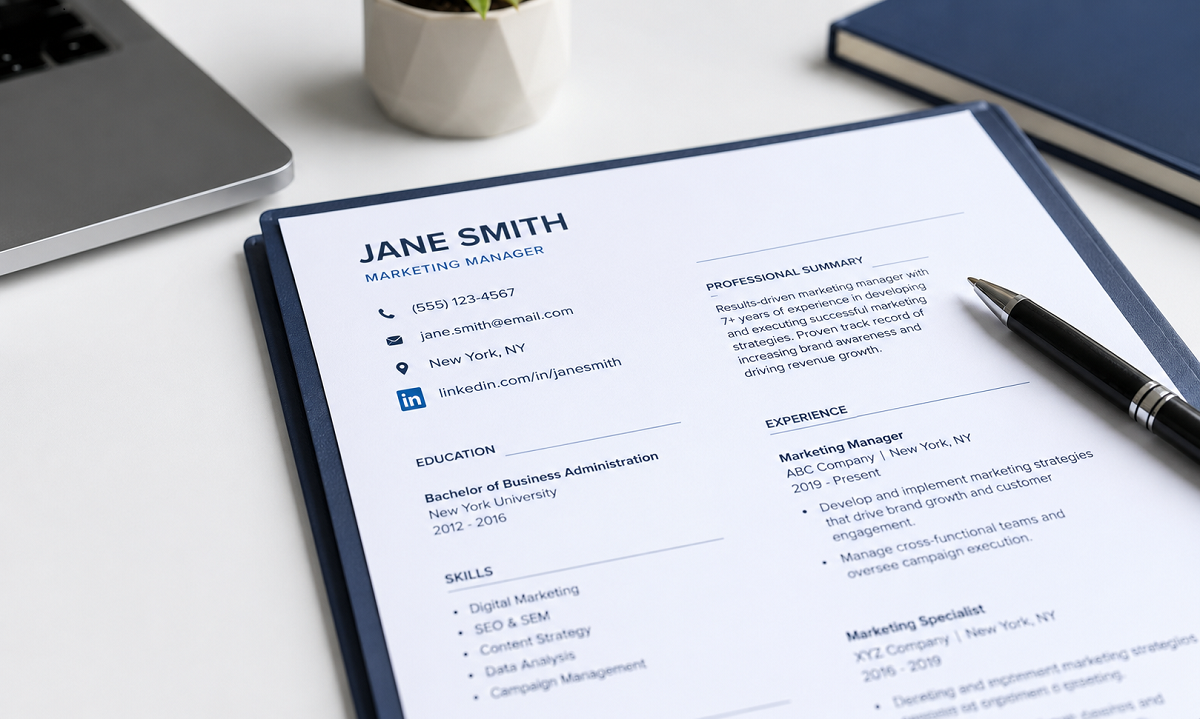
The correct placement for your LinkedIn profile on your resume is in the contact information section at the very top of the page. This is where hiring managers expect to find all your professional contact details and it is the first place they look when they want to reach out or learn more about you.
Your contact information header should include your full name at the top, followed by your phone number, professional email address, your city and state, and your LinkedIn URL. Some professionals also include a link to a portfolio website or GitHub profile in this same section if relevant to their field.
A well-formatted contact section looks like this:
John Adekunle
Lagos, Nigeria | +234 801 234 5678 | john.adekunle@email.com | linkedin.com/in/johnadekunle
Keep the LinkedIn URL on the same line as your other contact details where possible to save vertical space. On a digital resume, the URL should be hyperlinked so a recruiter can click directly through to your profile. On a printed resume, the URL should be written clearly in full so someone can type it easily.
Step Three: How to Format Your LinkedIn URL on Your Resume
Formatting matters more than most people realize. A messy or unclear LinkedIn URL on your resume creates a poor first impression even before the recruiter reads your work history. Here are the formatting rules that professional resume writers consistently recommend.
Use the shortened version of your URL rather than the full address. Your LinkedIn URL does not need the https:// prefix or the www. prefix on a resume. Simply writing linkedin.com/in/yourname is clean, professional, and immediately recognizable to any recruiter.
Make the text the same font and size as the rest of your contact information. Some job seekers make the mistake of leaving the LinkedIn URL in blue hyperlink formatting which looks out of place against the clean formatting of the rest of their resume. Change the link color to black and remove the underline if you are submitting a digital PDF to match your overall design.
Do not label it with the word LinkedIn unless your formatting requires it for clarity. If you are listing multiple links such as LinkedIn and a portfolio site, a brief label helps. Otherwise, the linkedin.com/in/ prefix makes the URL self-explanatory.
For fresh graduates and students updating their resumes for the first time, our article on Internship Jobs in Lagos shows what top Lagos companies are looking for in intern applications right now, which helps you know how to position both your resume and your LinkedIn profile for maximum relevance.
Step Four: Optimize Your LinkedIn Before Adding It to Your Resume
Adding your LinkedIn profile to your resume only helps if the profile itself is strong enough to impress. A recruiter who clicks your link and finds an empty or half-complete profile will form a worse impression than if you had not included a link at all.
Before you add the link, spend thirty minutes making sure your LinkedIn profile meets these minimum standards. Your profile photo should be professional, clear, and recent. Your headline should describe your professional identity and specialization rather than just your job title. Your About section should read like a compelling professional summary that expands on what your resume cannot fully cover.
Your experience section should include measurable achievements for each role, not just a list of responsibilities. Your skills section should reflect the capabilities most relevant to your target roles. And ideally, you should have at least two or three recommendations from past managers, professors, or colleagues who can speak to your professional character and capabilities.
According to LinkedIn, profiles with professional photos receive 21 times more profile views and 36 times more messages than profiles without photos. That single detail alone is worth the five minutes it takes to upload a good headshot.
For professionals who want to pair a strong LinkedIn profile with an equally strong resume summary, our guide on Examples of Professional Summary in Resume gives you 50 ready-to-use templates across different industries and experience levels.
What Your LinkedIn Profile Should Include to Support Your Resume
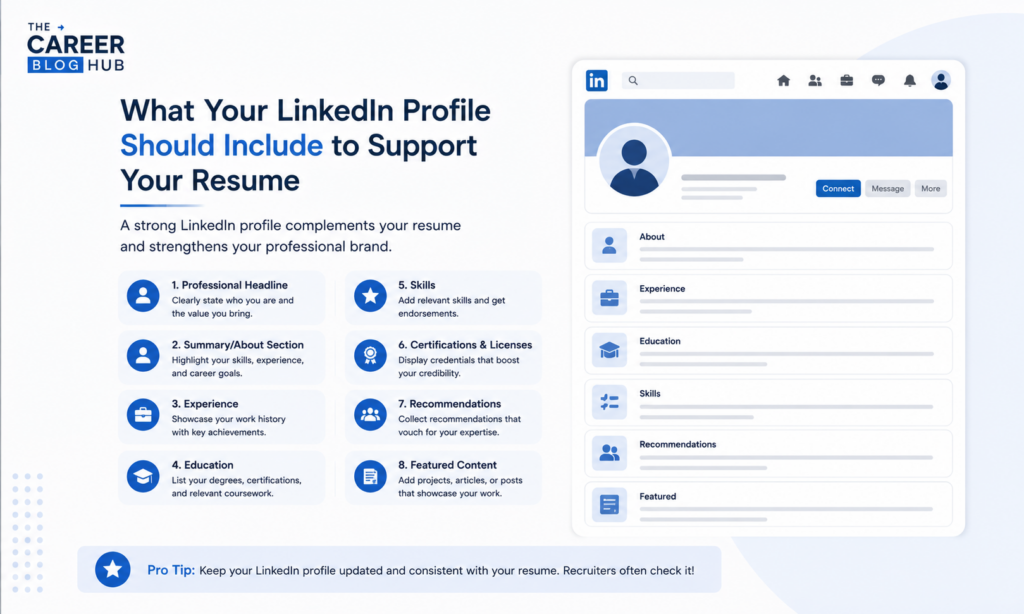
Your LinkedIn resume tips checklist should cover five areas that directly complement what your resume presents.
The first is your full work history with context that your resume cannot fit. While your resume might describe your most recent role in five bullet points, your LinkedIn experience section can include a full paragraph description, project highlights, media attachments, and specific achievements that tell a richer story.
The second is skills endorsements. Every skill you list on your resume should ideally appear in your LinkedIn skills section and have endorsements from people you have worked with. Endorsed skills carry third-party credibility that a resume cannot replicate.
The third is recommendations. A written recommendation from a past manager or colleague is one of the most powerful trust signals a recruiter can encounter during the evaluation process. Even two or three genuine recommendations significantly strengthen the overall impression your profile creates.
The fourth is activity and content. Recruiters who visit your profile notice whether you are professionally active on LinkedIn. Sharing relevant industry articles, commenting thoughtfully on posts in your field, or writing occasional original posts signals that you are engaged with your profession beyond just applying for jobs.
The fifth is consistency with your resume. Make absolutely sure that your dates of employment, job titles, company names, and educational credentials match exactly between your resume and your LinkedIn profile. Any discrepancy, even minor, creates doubt in a recruiter’s mind that is very difficult to overcome.
Common Mistakes to Avoid When Adding LinkedIn to Your Resume
- The most common mistake is adding a LinkedIn link without customizing the URL first. A link ending in a string of random numbers and letters signals that you did not take the time to present yourself professionally and that first impression carries weight.
- The second mistake is including LinkedIn on your resume without updating the profile first. Many Nigerian job seekers have LinkedIn profiles they created years ago and never maintained. If your profile still shows a role you left two years ago as your current position, clicking that link hurts your application significantly.
- The third mistake is using a personal or unprofessional email address alongside your LinkedIn link. Your entire contact section should signal professional seriousness. If your email address is something like sweetboy2001@yahoo.com, create a professional Gmail address using your name before you submit another application.
- The fourth mistake is not hyperlinking the URL in digital submissions. If you are submitting your resume as a PDF or Word document by email, the LinkedIn URL should be a clickable hyperlink. Recruiters who have to manually type a URL are less likely to visit your profile at all.
A Complete Resume Contact Section Example
Here is a full example of how your contact section should look with your LinkedIn included:
Adaeze Okonkwo
Port Harcourt, Rivers State | +234 802 345 6789 | adaeze.okonkwo@gmail.com | linkedin.com/in/adaezeokonkwo
This format is clean, professional, scannable, and gives the recruiter every contact method they need in five seconds of reading. The LinkedIn URL is right there alongside the phone number and email, making it effortless to follow up or learn more.
For professionals who are actively applying to jobs right now and want to make sure their resume and LinkedIn profile are working together to maximize responses, explore Jobs in Nigeria Today for verified current vacancies across every industry and city in Nigeria.
Make Your CV Stand Out
If your CV isn’t clearly showcasing your technical projects, academic achievements, SIWES readiness, leadership experience, and engineering or technology skills, you may be missing opportunities. A professionally structured CV can help present your value more effectively. Need yours refined? Contact us via WhatsApp: +2348145289661.
FAQs: Why you should and How to Put Your LinkedIn on Your Resume
Where exactly should I put my LinkedIn URL on my resume?
Your LinkedIn URL belongs in the contact information section at the very top of your resume, on the same line or directly beneath your phone number and email address. It should never be buried in the body of your resume or listed as a footnote. Recruiters look at the top of the page first and that is where all contact details should live.
Should I include the full LinkedIn URL or just the short version?
Use the short version without the https:// or www. prefix. Simply write linkedin.com/in/yourname. This looks cleaner, takes up less space, and is immediately recognizable. Make sure the text is hyperlinked in any digital submission so recruiters can click through directly.
Does adding LinkedIn to my resume really make a difference?
Yes, measurably so. Recruiters increasingly expect to find a LinkedIn link on professional resumes and its absence can signal that a candidate is not fully engaged with their professional presence. More importantly, a strong LinkedIn profile gives you the space to tell a more complete and compelling professional story than a two-page resume ever can.
Conclusion: Start Adding LinkedIn to Your Resume the Right Way
Your is a small detail with a significant professional impact. A customized link, placed correctly, connected to a strong profile, and formatted consistently with the rest of your contact information, can meaningfully improve how hiring managers perceive and respond to your application.
Take thirty minutes today to customize your LinkedIn URL, update your profile to match your resume, and add the link to your contact section. Then apply to the opportunities that match your skills and experience with a complete professional package that gives every recruiter everything they need to say yes.
For fresh graduates and students working on their complete application package, our Top 30 Graduate Trainee Roles page shows the best structured entry level programmes currently available at Nigeria’s leading employers across every sector.
Keep visiting thecareerbloghub for more practical career guides, resume tips, job listings, and application resources that help Nigerian professionals present themselves at their very best and land the opportunities they deserve.